

ReMarkable Planner Templates Worth Trying in 2026
The number one issue with the planner templates available on the web (and I've downloaded a few) is that they are created for apps and devices that aren't reMarkable-friendly. Most of them have clickable tabs, and/or many interactive areas. When you bring the template into the reMarkable the tabs stop working, the form fields freeze up. You paid $15 for a PDF that now looks broken on your screen.
I've rounded up a few reMarkable planner templates that don't break when you bring them into your e-ink tablet. Each one was chosen for its navigation, how clear the layout is and whether it handles the rendering limitations of e-ink without breaking.
What Makes a Good reMarkable Planner Template
There are several things that set a functional reMarkable planner apart from one that breaks.

Hyperlinked Navigation
Navigation is key to using a planner effectively. A good template allows you to go from the monthly view and click on a date to take you to the individual days page. A "back to month" button will take you back to the monthly view. If there is no navigation, you're going to be scrolling through hundreds of pages by hand. The reMarkable supports internal PDF hyperlinks very well, so any template that was made with this in mind will work very well.
E-Ink Optimized Layout
Many planners are made for color iPad screens. The templates may use light gray lines, soft background colors and very small font sizes that are nearly unreadable on e-ink. A good reMarkable template will use a high contrast layout with thicker borders and larger writing areas. Although the reMarkable Paper Pro does support color, bold and simple layouts are much easier to read and write on even with color.
Free reMarkable Planner Templates
You don't have to pay money to have a great planner for your reMarkable. There are a few free options worth trying:
1. reMarkable Official Planner Templates
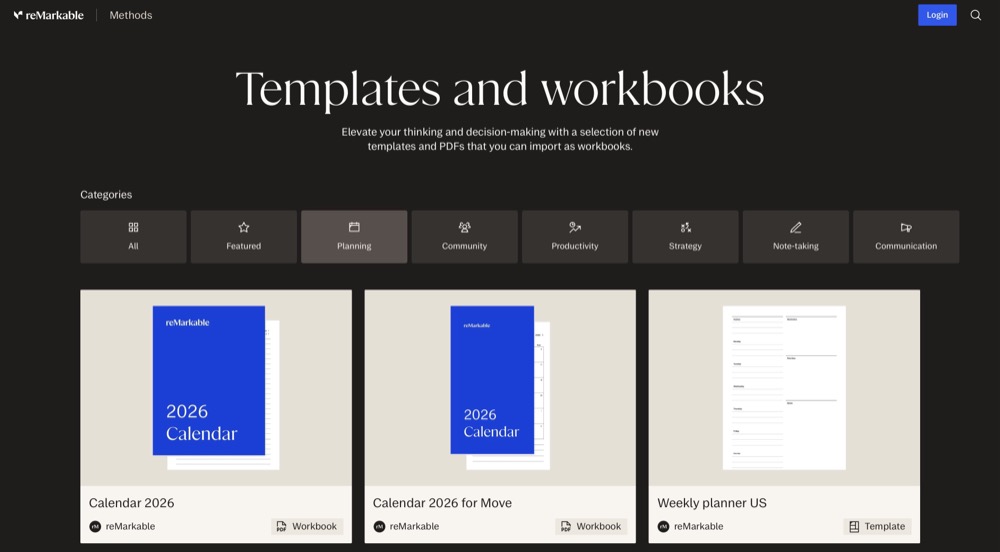
With every reMarkable shipped, comes a few built-in planner templates. In addition to that, reMarkable offers additional downloadables through their methods gallery. Included in the downloads are daily planners, weekly views and goal trackers optimized for the reMarkable screen. As the downloads come from reMarkable, the templates render cleanly and the layouts fit the device perfectly.
However, some of the official templates are generic planners and are not dated. So each day, you'll need to write the date in. This works fine for users who prefer a blank slate, however, users who would like pre-dated pages with month and week navigation will need to either look for a specific yearly planner at reMarkable Methods, or keep reading.
2. Reddit Community Templates
The r/RemarkableTablet community on Reddit is a fantastic source of free reMarkable planner templates. Many members create and share their own custom templates frequently and the community provides feedback to help ensure you get a good template that won't break once loaded onto your reMarkable. There is a weekly thread that rounds up dozens of free and paid templates for different purposes (i.e. daily planners, habit trackers, etc).
Keep in mind that the quality of the templates vary greatly. Some are polished multi-page planners with full navigation, others are single-page templates designed as PDF backgrounds that you can fill out. Make sure to review the comments prior to downloading, and verify whether the template was created specifically for the reMarkable or if it was created for another platform and simply adapted.
3. eInkPads Free Collection
eInkPads offers a combination of free and paid templates, all built specifically for e-ink devices. The free collection contains basic planners with internal link navigation. The layouts are plain and clean, making them perfect for the reMarkable screen. eInkPads releases updated templates for each calendar year, so you receive dated pages for 2026.
Paid reMarkable Planner Templates
If you desire more polish, dated pages, and professional layouts, paid templates provide much more structure.

4. OnPlanners reMarkable Collection
OnPlanners sells exclusive reMarkable planner templates, priced between $5-$20. Their 2026 planners contain pre-dated daily, weekly, and monthly pages. Each page contains hyperlinks, allowing you to quickly navigate between views without having to scroll through multiple pages. They also include bonus pages such as habit trackers, reading logs and finance pages.
As templates are designed for the reMarkable screen size and not converted from iPad layouts, the writing areas are also designed with the Marker pen in mind and the tab navigation is large enough to easily tap on e-ink. Additionally, OnPlanners updates their templates annually, so you can get a new dated planner without searching for a new vendor.
5. Etsy Handmade Templates
Etsy has become a marketplace for independent vendors creating and selling reMarkable planners. Pricing for the templates ranges from $3-$30, depending on the complexity of the template. The benefits of shopping on Etsy are the numerous unique and niche planners that exist on the site that can't be found on other marketplaces (student planners, teacher planners, project manager planners, fitness planners, meal planners).
The risks associated with shopping on Etsy are inconsistent quality. While many Etsy sellers test their templates on a real reMarkable device, some simply convert a GoodNotes template and sell it as "compatible with the reMarkable." Before purchasing, please check the description of the template for references to reMarkable compatibility, and examine the reviews of previous buyers. If an Etsy seller demonstrates a screenshot of a template on an actual reMarkable screen, that's a positive indicator.
6. Planner Pads Pro
Planner Pads offers a structured planning system utilizing their paper planner methodologies. The digital version of their planner for the reMarkable utilizes a three-tiered approach: a weekly "funnel" view where you record all tasks, then prioritize them into daily blocks, then track your progress. While the system is more prescriptive than most templates, if you'd like a system, not just a layout, this is one of the more comprehensive options.
The reMarkable version includes full-year navigation and weekly planning pages. While priced at approximately $15 per year, this falls in the middle of the pricing scale for paid templates.
Beyond Static Templates: Calendar Sync Planners
All of the six templates listed above have a common flaw. They are static files. Your actual calendar events do not appear in the planner. Each day you check your phone for your meetings and write them down in the planner by hand. If a meeting is moved from 10am to 2pm, you cross it out and write it again.

7. Planneriffic: Dynamic Calendar Sync
Planneriffic approaches the problem of static files in a different manner. Instead of providing you with a blank template to fill in, Planneriffic generates a full planner PDF from your actual Google, Outlook or Apple Calendar events. Once you plug your reMarkable in via USB, your planner will have all of your actual meetings, appointments and deadlines entered in the correct time slots.
The generated PDF includes yearly, monthly, weekly and daily views with full hyperlink navigation. The layout of the generated PDF will resemble a premium PDF planner template, but the content will reflect your actual schedule. Each time your calendar changes, the next sync will update your planner. Your handwritten notes are preserved during each sync.
Planneriffic is available for Mac and Windows. All calendar processing occurs locally on your computer, so your calendar event data will never leave your computer. Planneriffic costs $29 as a one-time payment with a 7-day free trial to allow you to test it before making a purchase.
For individuals with busy or unpredictable schedules, Planneriffic removes the largest pain point of static templates: keeping the planner in sync with your real world.
How to Load Planner Templates Onto Your reMarkable
Loading a PDF planner onto your reMarkable can occur in one of three ways.
The simplest way is through the reMarkable desktop application. Simply drag the PDF file into the desktop app window and it will be synced to your reMarkable through the cloud. This method requires a reMarkable Connect subscription.
The second method is by using USB transfer through Developer Mode. This method is free and doesn't require the internet. You enable Developer Mode on your reMarkable, plug it into your computer via USB, and copy the file directly. Check the installation guide for a detailed walkthrough.
The final method is through email. Send the PDF to your reMarkable email address and it will be displayed on your device. This method also requires a reMarkable Connect subscription.
When using Planneriffic to sync your calendar, the app will handle the USB transfer process automatically. You simply need to connect your cable and press sync.
Frequently Asked Questions

Are reMarkable planner templates free?
Yes, some are free and some are paid. reMarkable includes built-in templates at no cost, and the methods gallery offers free downloadable planners. The Reddit community shares free user-created templates regularly. Paid templates from websites such as OnPlanners and Etsy range from $3-$30.
Can I use a GoodNotes planner on my reMarkable?
While some GoodNotes planners will function partially, most utilize interactive elements that will fail on the reMarkable. Interactive elements include fillable form fields, JavaScript interactions, and some types of annotations. For optimal functionality, choose templates developed exclusively for the reMarkable.
Do reMarkable planner templates support color?
Templates for the reMarkable Paper Pro will display color elements in color. Templates for older reMarkable models (the reMarkable 2) will display all PDFs in grayscale. Choose a template that will be readable in both color and B&W if you plan to use your template on either model.
How often will I need to replace my planner template?
Unless you choose a dated template, you will likely need a new template file at the beginning of each year. Undated templates can be used indefinitely. Apps such as Planneriffic will generate new planners automatically each time your calendar is updated. Any handwritten notes you've added to your previous planner file will remain intact, but will not be transferred to your new planner file.
Will my handwritten notes remain intact if I replace the entire PDF file?
If you replace the entire PDF file, the handwritten notes you've recorded on the old file will remain intact in that file, but will not be imported into your new file. Planneriffic preserves your handwritten notes during each sync, while updating only the upcoming calendar pages in your new file. If you're using static templates, you might want to save your previous file and store it on the reMarkable as an archive in order to refer to it later.
Do I need Developer Mode for planner templates?
No, you don't need Developer Mode to load PDF planners. You can load PDF planners via the reMarkable Desktop Application or via email. However, you will need Developer Mode enabled if you wish to load a PDF planner via USB transfer (without syncing via the cloud), or if you wish to run apps such as Planneriffic that sync directly via USB. According to reMarkable's documentation, enabling Developer Mode does not void your warranty.